
Release Notes
Jive Event Tile 2.1.2 enhancement and Slider Tile 3.2.1 bug fix
Posted by SE Marketing on
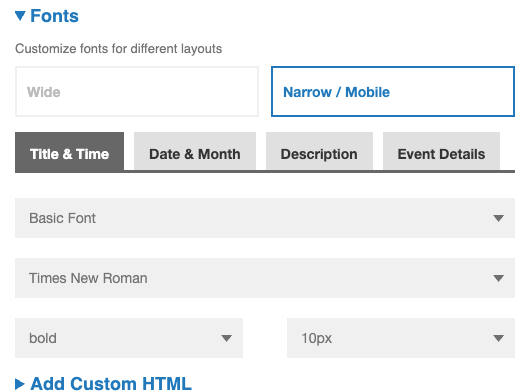
Here are the latest adjustments to the Jive Event Tile and Slider Tile Event Tile 2.1.2 Enhancements & bug fix: Per feedback from several customers, we've made adjustments to the narrow version of the event tile, focusing on UI improvements and configuration options. Font sizes for both wide and narrow/mobile for all text/number elements are now configurable. The background color behind the month is now configurable by linking it to the "Theme" => "Highlight color" setting, addressing the previous limitation of a hardcoded color. The direction of the chevron arrow was corrected to point down when collapsed, with the change visible on...
Bug update for Jive Accordion, Activity, Blog, Event, Hero, Navigation, Place Grid, Search, Slider
Posted by SE Marketing on
Bug: The custom HTML header/footer was not displaying properly in the most recent releases for these Jive tiles. We've fixed the component. Please download the new versions for the following tiles: accordion - 3.2.1 activity tile - 2.2.1 blog - 2.3.1 event - 2.1.1 hero - 3.1.0 navigation - 3.1.1 place grid - 2.2.1 search - 3.1.0 slider - 3.2.0
Updates to Jive accordion, navigation, ideas, video, activity
Posted by SE Marketing on
The following Jive tiles (accordion, navigation, ideas, video and activity) were updated to ensure that the Google Analytics component supports GA4 Analytics. Meanwhile, the UA-XXXXX code has become renamed as "Legacy". In the configuration panel for these tiles now show tabs for GA4 | Google Tag Manager | Legacy (UA) In addition, the video and activity tile have been reviewed and updated to esnure they are compliant with WCAG 2.1 Accessibility standards.
Updates to Jive Content Quadrant and Event Tile
Posted by SE Marketing on
Jive Mosaic version 3.3 - alt-text for images added
Posted by SE Marketing on
Enhancement: Allow for image descriptions (alt-text) to be added. As an admin configuring the Mosaic tile, I now have the option to input an Image Description (Alt-Text) in a field for each story, so that viewers of the page will be able to “read” the image. Note when the global admin installs the new version of the tile, the tiles will automatically pre-fill the Image description field with the Title of the story.